MadMapper 6 vs Older Versions: What Actually Changed and Why It Matters
I have been using MadMapper since around 2012. I have watched it grow through every version — small updates, bigger updates, and then version 6, which was in a different category entirely. I did not expect to stop and pay attention the way I did. But when the timeline dropped, my entire workflow changed.
If you are on an older version and wondering whether to upgrade, or if you are new and trying to understand what MadMapper 6 actually is — here is my honest breakdown.
MadMapper Grew Up — And So Did I
MadMapper grew up over the past fourteen or fifteen years like I did. I am more controlled, more matured, more intelligent, and more capable than I was in 2012. So is MadMapper. Version 6 is not just a newer release — it is a software that has genuinely evolved into something more serious, more structured, and more powerful than what came before it.
That said, let me be specific. There are three areas where MM6 changed things that matter in real show environments.
1. The Interface Was Redesigned and Reorganized
If you are moving from MadMapper 4 or 5, expect things to have moved. The output panel, the surface controls, the media browser — the layout was restructured in version 6. For someone learning fresh, this is irrelevant. For someone coming from an older version, the first hour or two will feel disorienting until things click back into place.
The redesign was not cosmetic. The organization reflects a cleaner separation of concerns — your outputs, your surfaces, your media, your cues each live in more logical places. Once you understand the new structure, it is faster to work in. But the transition requires intention. Do not assume you can open MM6 and everything will be where you left it.
2. The Rendering Engine Got a Serious Upgrade
Performance matters at show scale. The engine upgrade in version 6 is noticeable in complex projects — multi-projector setups, LED display processing, anything with significant media throughput. I am not going to give you benchmark numbers because every system is different, but I will say that MM6 handles workloads that earlier versions struggled with.
For small installations this difference is minimal. For large-scale productions it is real, and it matters.
3. The Timeline — This Is the Big One
When MadMapper 6 dropped, the timeline was what made me stop. It completely rewired how I think about show programming.
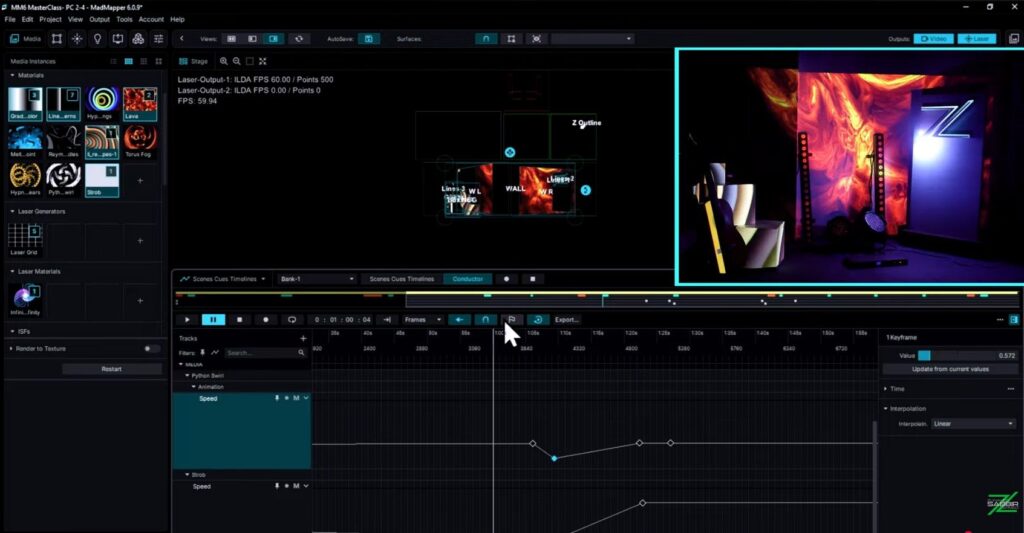
In older versions, timeline was functional but limited. In MM6, it became the backbone of structured show programming — with a level of control over scenes, cues, and multi-output sequencing that simply did not exist before. The conductor and keyframe editing features look small on paper. Inside a real show environment, they are enormous. They give you precision over timing and transitions that previously required external automation or workarounds.
If you are still on MadMapper 5, the timeline alone is the reason to upgrade. Not because MM5 is broken. Because what you can build in MM6’s timeline is a different category of show.
What About MadMapper 3 and 4 Courses?
There are courses online — mostly on Udemy — built on MadMapper 3 and 4. Check their publish dates. You will understand quickly how old they are. The fundamental concepts of projection mapping carry across versions, but the interface, the workflow, and especially the timeline in MM6 are different enough that older course material will mislead you in practical moments.
This is one of the reasons I built the MadMapper 6 Masterclass. It is built on version 6, from the ground up. Every chapter reflects the current interface, the current workflow, and the current capabilities of the software. It works for complete beginners and for experienced mappers who want a clean re-entry into MM6 without the friction of outdated reference material.
Should You Upgrade?
If you are on MadMapper 5: upgrade for everything better. Literally. There is no single compelling feature — the whole system is more capable. If you are on MM3 or MM4: the gap is even larger. The interface you learned on and the interface in MM6 are genuinely different products in terms of workflow.
The best time to start learning MadMapper 6 properly is now — while you are making the transition, before old habits from earlier versions get locked in.
I am a certified MadMapper trainer, recognized by MadMapper directly. If you want to go deeper on what MM6 offers and how to build with it properly, that is what the Masterclass is for.