
Laser Mapping Kit V1 for Resolume
I live in Resolume Arena. When I wanted lasers in the same show, every route I knew meant more software, more cost and more learning. I am partnering with the Studio Z Shop to promote this kit to you because it removed that problem for me: I stay in Resolume Arena, and the laser follows.
Laser Mapping Kit V1 for Resolume is a complete kit from Studio-Z.CA that lets you send your Resolume Arena visuals to real laser projectors. It includes the Visual to LaZzer app, five ready animations, a sample Resolume Arena project, an output setup file, a hardware purchase guide and an activation code. You need no other laser software. It runs on Windows and Mac (M series) and works with Resolume Arena, not Resolume Avenue.
| Key fact | Detail |
|---|---|
| Product | Laser Mapping Kit V1 for Resolume, by Studio-Z.CA |
| App | Visual to LaZzer |
| Works with | Resolume Arena (not Resolume Avenue) |
| Platforms | Windows and Mac (M series Apple Silicon) |
| Editions | Standard $99 (2 laser outputs); Pro $199 (8 laser outputs, advanced features) |
| Upgrade | Standard to Pro for $100 |
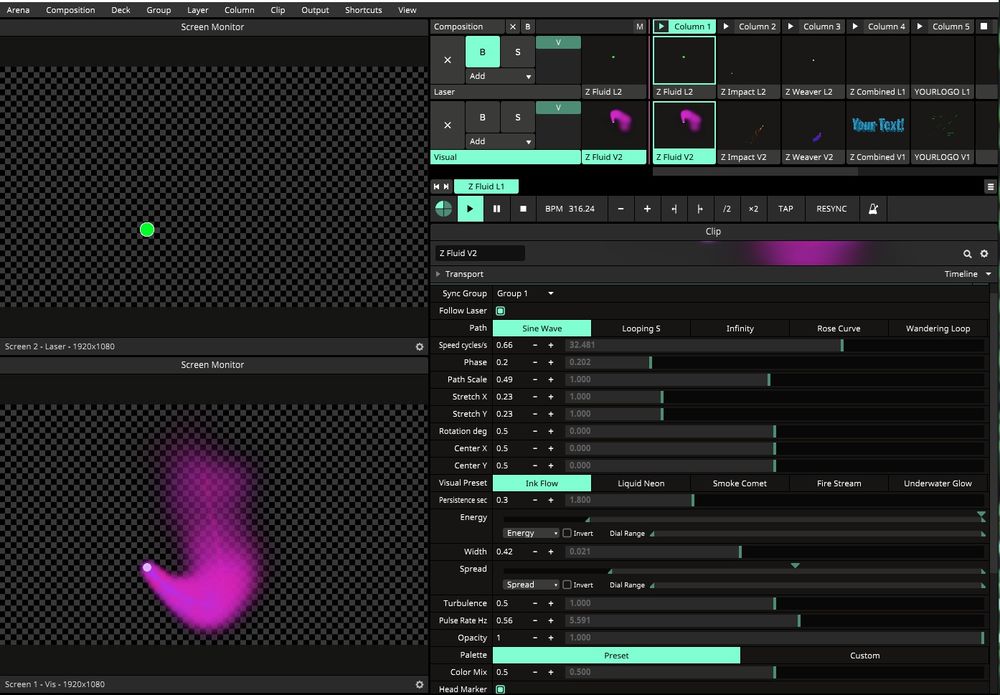
| Five animations | Fluid Comet, Pulse Weaver, Particle Impact, Your Text, Your Logo. Each has a laser version and a matching visual version. |
| Included | App, five animations, sample project, output setup, hardware purchase guide, activation code |
| Not included | The laser projector and its controller box |
| Setup time | About 3 to 4 minutes once your laser and display are placed and your playlist is ready |
| Tested with | 2 x 15 W lasers at real shows |
Can I use Resolume Arena with lasers?
Yes. This kit is built for exactly that. You make or play your visuals in Resolume Arena as usual, open Visual to LaZzer, and your lasers draw them.
The promise is simple: create it in Resolume Arena, project it with lasers.
Why I tried it
I spent hours learning Resolume Arena and getting better at it. I was glad I did not have to learn new software to go from visual mapping to laser mapping. Every creative trick I already use in Resolume Arena works on lasers.
From my experience
Resolume Arena already holds my clips, effects, controllers and timing. Lasers did not have to mean a second workflow.
What changed for me
Before this kit I used another tool that makes laser graphics from video, but without colour. Then I used expensive laser software that I had to learn before it would work with Resolume Arena. The other route was Resolume Arena, LaserBridge and Pangolin BEYOND. All of it was expensive.
From my experience
Now everything is in one pack and the price is affordable. Every feature is editable on the fly, the show stays light and fast, and I change visuals live with my controller.
Everything is integrated with Resolume Arena, every feature is editable on the fly, and the show stays light and very fast.
From my experience
Real shows
I have used this workflow at two shows: the launch of ACI Pharmaceuticals’ product Ethoras, and the 7 November National Revolution and Solidarity Day show. Both ran 2 x 15 W lasers with Resolume Arena and custom content.
From my experience
How does it work?
- Make or play your visuals in Resolume Arena.
- Open Visual to LaZzer.
- Your lasers draw them.
Pick a source, pick your laser, and line the picture up with your surface. That is the whole idea.

What can I make?
Any shape can become a laser now. All you do is imagine it. Logos, text and your own visuals all work, and the five included animations get you started the same day.
See Laser logos and text from Resolume Arena.
What do I need to buy?
The laser projector and its controller box. The hardware purchase guide in the kit shows how to build your setup from the least expensive combination up to professional gear. Lasers from 300 mW up to 50 W work with the right hardware.
For the full list, read Laser mapping hardware purchase guide by budget.
What is in the kit?
| Item | What it does |
|---|---|
| Visual to LaZzer app | Sends your Resolume Arena visuals to your laser as full-colour graphics |
| Five animations | Ready to play, each with a laser version and a matching visual version |
| Sample Resolume Arena project | Open it and play: the animations are already loaded |
| Output setup | Load it in Resolume Arena to send the picture out |
| Hardware purchase guide | Shows what to buy, from the least expensive combination up |
| Activation code | Emailed after purchase, entered in the app |
The five animations
Fluid Comet, Pulse Weaver, Particle Impact, Your Text and Your Logo. Each one has a laser version and a matching visual version, and all five are loaded in the sample Resolume Arena project. Your Text takes your own words in 2D or 3D, and Your Logo loads your own SVG. See Laser logos and text from Resolume Arena.
Standard or Pro?
Both editions include the app, the five animations, the sample project, the output setup and the hardware purchase guide. Standard runs 2 laser outputs. Pro runs 8 laser outputs, adds advanced features and a Pro mode, and includes early access to future updates and new additions. You can start with Standard and upgrade to Pro later for $100.
Frequently asked questions
Do I need Pangolin or other paid laser software?
No. The kit replaces the need for separate paid laser software. Read more in the post about whether you need Pangolin with Resolume Arena.
Does it work with Resolume Avenue?
No. It works with Resolume Arena only.
Does it run on Windows and Mac (M series)?
Yes, both. On Apple computers it is tested on M series Apple Silicon, and not all Apple devices are supported.
Do I need to learn new software?
No. You keep working in Resolume Arena. The kit upgrades what you can do with the skills you already have.
How long does setup take?
About 3 to 4 minutes once your laser and display are placed and your playlist is ready.
Is the laser projector included?
No. The hardware purchase guide helps you choose one at any budget.
How many lasers can I run?
Two with Standard, eight with Pro.
What does Pro add?
Eight laser outputs instead of two, advanced features, a Pro mode, and early access to future updates and new additions.
Can I upgrade from Standard to Pro?
Yes. The licence upgrade costs $100.
Can I use my own visuals?
Yes. Use the five included animations or anything you make in Resolume Arena.
Can I change the visuals live?
Yes. You are not limited to pre-made footage.
How does licensing work?
One licence per user. The activation key is emailed after purchase, and the app is active on one computer at a time.
Keep reading
- Do I need Pangolin to use lasers with Resolume Arena?
- How to send Resolume Arena visuals to a laser projector
- Laser Mapping Kit vs Pangolin vs LaserBridge
Get the kit: Laser Mapping Kit V1 for Resolume · Hardware purchase guide
